|
|
| Line 23: |
Line 23: |
| | | | |
| | [[image:Blink_chiyoda_keins_display_notes_send.jpg|550px]] | | [[image:Blink_chiyoda_keins_display_notes_send.jpg|550px]] |
| − |
| |
| − |
| |
| − |
| |
| − | ===[[image:Check.jpg|25px]] Four New Passworded Sections ===
| |
| − |
| |
| − | [[image:Benderlink_newpassword_sections.jpg|550px]]<br><br>
| |
| − |
| |
| − | [[image:Benderlink_newpassword_sections_6.jpg|250px]]<br><br>
| |
| − |
| |
| − | There are four new passworded sections available within Benderlink using the [[Password Manager]] software available to administrators.<br><br>
| |
| − |
| |
| − | They are BENDER, CHANNEL, GET, and SEND:<br><br>
| |
| − |
| |
| − | <table cellpadding="15" width = 650>
| |
| − | <tr>
| |
| − | <td bgcolor="#abbad1">Bender Number Selection<br>
| |
| − | [[image:Benderlink_newpassword_sections_1.jpg]]</td>
| |
| − | <td bgcolor="#e3e4f5">[[image:Benderlink_newpassword_sections_5.jpg|right]]The password is requested when pressing the green checkmark button to exit the Selection Dialog</td>
| |
| − | </tr>
| |
| − |
| |
| − | <tr>
| |
| − | <td bgcolor="#abbad1">Channel Selection<br>
| |
| − | [[image:Benderlink_newpassword_sections_2.jpg]]</td>
| |
| − | <td>[[image:Benderlink_newpassword_sections_5.jpg|right]]The password is requested when pressing the green checkmark button to exit the Selection Dialog</td>
| |
| − | </tr>
| |
| − |
| |
| − | <tr>
| |
| − | <td bgcolor="#abbad1">Get Button<br>
| |
| − | [[image:Benderlink_newpassword_sections_3.jpg]]</td>
| |
| − | <td bgcolor="#e3e4f5">The password is requested before data is retrieved from the bender</td>
| |
| − | </tr>
| |
| − |
| |
| − | <tr>
| |
| − | <td bgcolor="#abbad1">Send Button<br>
| |
| − | [[image:Benderlink_newpassword_sections_4.jpg]]</td>
| |
| − | <td>The password is requested before data is sent to the bender</td>
| |
| − | </tr>
| |
| − |
| |
| − | </table>
| |
| − |
| |
| − | <br><br>
| |
| − | If an incorrect password is entered, then the operator will see a screen like this:
| |
| − | <br><br>
| |
| − | [[image:Benderlink_newpassword_sections_7.jpg]]
| |
Revision as of 05:40, 21 December 2007

 New - Ask for Diameter Feature
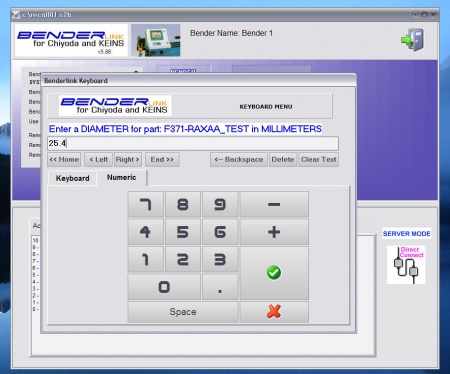
Benderlink now asks for the user to enter a diameter value if data is being transferred to Supravision with a diameter value of ZERO.
This meets the requirement of ROMER DOCS software - which requires a valid diameter value in order to import data from a Supravision file.
New - Show NOTES Before SEND
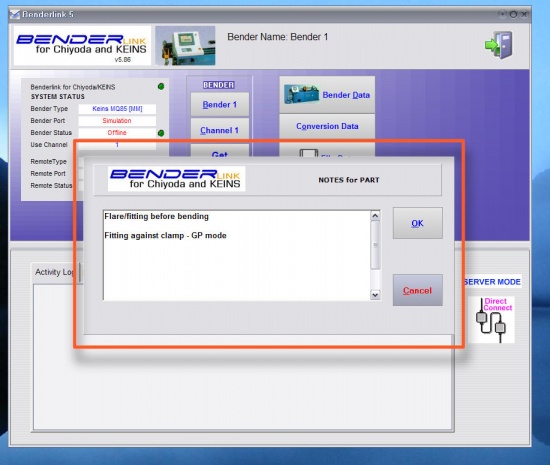
Benderlink now shows the notes in a pop-up dialog before sending data using the SEND button on the main menu.